History
The Brick Archive is a long running project of mine, technically starting in 2022 when I decided on taking all of the loose Lego pieces in my house and sorting them by colour, storing them in many many large freezer bags. After that was finished I had another idea. I thought to myself “Should I count all of this sorted Lego?” and of course I rejected that idea, because that would take a long time and would be incredibly repetitive.
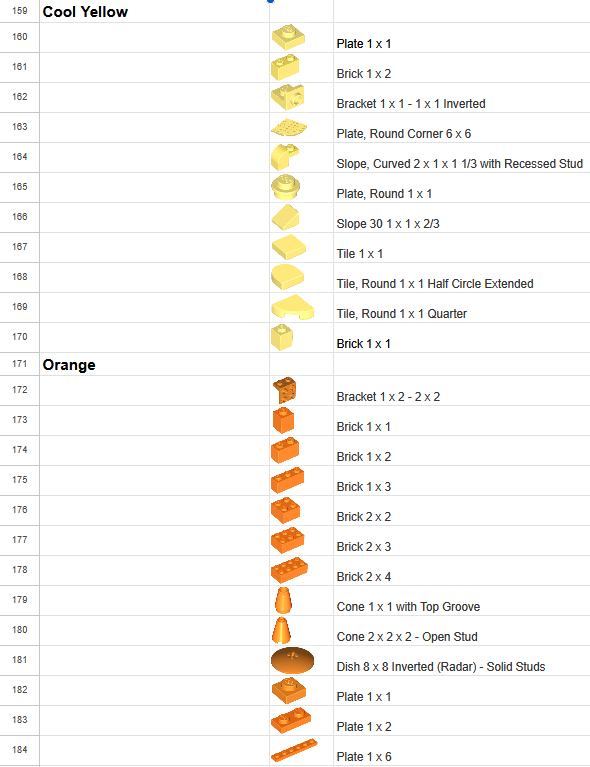
It was then about a year later in 2023 when I decided to start that spreadsheet tallying all of that sorted Lego, this process took forever and wouldn’t be finished until about the end of April 2024. This date is especially significant because I had just finished my first year of the Lakehead-Georgian Partnership program and with finishing my first year came experience with web development. Thus began the ongoing saga of my venture into the creation of a front and back end for my initial short venture in sorting loose Lego.
Starting Point
Tasks
But before I began development on a front end I needed data, more specifically I needed the spreadsheet data to be transformed into usable SQL insert statements, so that the database can hold it.
So I designed a one table database to store those pieces and the needed information. But another problem arose because within the spreadsheet image storage is simple, you can simply just insert it into the table and move on, however this cannot be the case with how I wanted to go about making this website
During classes any images used would be stored on the device and within the file system itself, which works for the small applications built in class. However the spreadsheet at the time had close to 4000 rows which equates to close to 4000 images which I did not want to host on my device.
Action
Manually writing out insert statements or re-entering the data into the database, would extend the timeline of this project out by months if not a year, so I decided to smartly use an LLM to streamline and shorten this process. I instructed it to take the copied data from the spreadsheet and format it into the specific way I would like, this decision would take a multi-month task and shorten it into a week long task.
To solve the image hosting issue I elected to make use of GitHub pages, not only would it act as a backup of all of my images I needed in-case of emergency, but GitHub pages can be used as a small live server for website that make use of only HTML, CSS and JavaScript, which can be used to reference images by putting the filename after the GitHub pages link and automatically display them when that link is used in an HTML image tag.
The Application as it Currently Stands
Functionality
Currently the application’s foundational functionality is complete, with additional functionality both finished and unfinished scattered throughout.
CRUD
Currently the application implements the Create, Read, Update and Delete (CRUD) functionality that you would expect from an inventory management application.
These implementations allow users to alter the online database through the creation of new entries, viewing of existing entries, the updating of information of existing entries and the deletion of existing entries.
These behaviours establish a foundational baseline for the applications inventory management functionality
Searching
Currently the application has a search functionality that allows the user to search for a specific piece
Through the following categories
- Piece Name
- Unique Piece Code
- Piece Colour
- Quantity of Pieces
The search system works through a specificity system, that being the more specific categories will be searched for a hit first and if it finds entries based on the search parameter it will return those entries. An example would be the search “Bright Yellow”, the application would first search the colour column and if the search query returns one or more entries the application will return every one of those entries.
A rudimentary system sure, but one that for the time being works well enough to fit the current needs of development
Categories
Currently the application supports a categories system for the pieces, where under “Master Categories” pieces can be searched by various sub-categories based on various attributes about the pieces. When a sub-category is searched only pieces belonging to that sub-category will appear on the search page.